Working Together Through The COVID-19 Virus Outbreak
This Page Offers Resources to Help Develop a Contingency Plan for Educational Continuity Through This Difficult Time.
This Page Offers Resources to Help Develop a Contingency Plan for Educational Continuity Through This Difficult Time.
Reviewing suggested achievement levels
For suggested achievement levels to appear in assignments and discussions, all of the following conditions must be met:
- An instructor makes an assessment on a rubric that has outcomes aligned to criteria.
- There are mappings set up between the rubric and the assessment outcomes.
- A default achievement scale has been defined for the organization
- Suggestions are turned on using the d2l.tools.LearningOutcomes.LoaSuggestions configuration variable.
When these conditions are met, a suggested achievement level is automatically displayed based on point thresholds or scale alignment levels mapped in the rubric. The instructor can accept the suggested achievement level, or select a different level, based on a more holistic evaluation of the learner's effort.
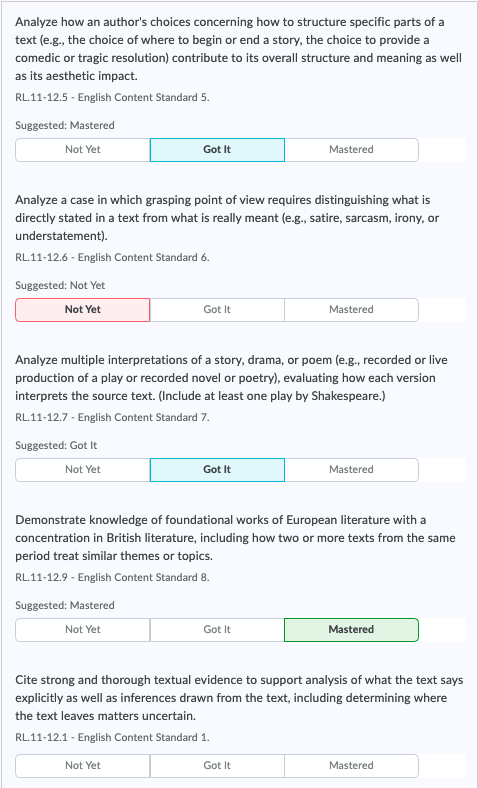
Figure: Rubric items aligned with outcomes provide information results in suggested achievement levels, which can be adjusted by instructors.
To review rubric mapping and use suggested achievement outcomes:
- Using a rubric that is mapped to assessment outcomes, grade a learner submission.
- Review the suggested achievement levels for each assessment outcome.
- If any suggestions are not accurate for the learner, click to select a different level of achievement.