About browsing
The Browse functionality presents a directory view of learning objects according to the IEEE LOM Classification Taxonomy fields. The classification organizes objects according to a hierarchical or tree structure. Individual learning objects in the tree are nodes, and the path from the root node to any other node is a classification taxonomy path (or taxon path).
Browse enables you to traverse this hierarchy of learning objects. At any level in the hierarchy, you can search for all learning objects classified at that level and below. This includes objects from external repositories whose metadata has been harvested.
The browse page includes a count of objects in each category. You can browse by author, publisher, or course.
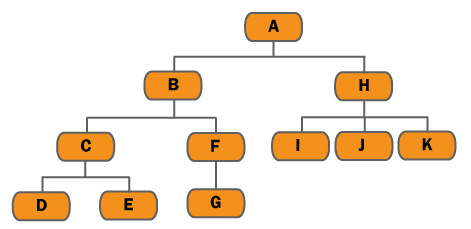
For example, in the provided diagram:
- Browsing on “A -> B” will retrieve all learning objects classified within B, C, D, E, F, and G
- Browsing on “A -> B -> F -> G” will retrieve all learning objects classified within G
- Browsing on “A -> H” will retrieve all learning objects classified within H, I, J, and K